
AI Pornstars: What Actually Works in 2026
AI Pornstars Scored: The Rows That Decide It
What surprised me most about this category is how many "AI pornstars" turn out to be one pretty render that can't talk back. The ones worth your time remember your name, send a new photo when you ask and star in a clip with that same face. Very few apps manage all three on one character.
So this scorecard grades the job a porn star actually does, not how good one picture looks.
| What she has to do | GoLove.ai | Image-only AI porn generators | AI companion chat apps | Creator AI-clone chatbots |
|---|---|---|---|---|
| Chat realism | ✓ | ✗ | ✓ | partial |
| Memory / voice continuity | ✓ | ✗ | partial | partial |
| In-chat photo requests | ✓ | ✗ | partial | partial |
| Video (same character + presets) | ✓ | partial | partial | ✗ |
| Custom character creation | ✓ | ✓ | partial | ✗ |
| Entry friction | ✓ low | ✓ low | ✓ low | partial |
| Free-tier depth | partial | partial | partial | ✗ |
GoLove.ai is my pick for a simple reason. It's the only column with a ✓ on every row that makes a character a performer rather than a picture: memory, in-chat photos, video on the same character and building your own. The image generators deserve credit, though, because nothing else gives you as much prompt control. (A prompt box still can't text you back.) If you'd like the chat-first apps compared side by side, see a breakdown of OurDream alternatives and how they stack up.
To check the memory and photo rows for yourself, Explore is the fastest route. It opens a chat straight away with nothing to build first, so pick a realistic character and send her one message.
What an AI Pornstar Is (and What She Shouldn't Be)
In 2026, "AI pornstar" describes a job, not a picture. She's a persistent fictional character you chat with and generate media of. She isn't a single image, and she isn't a real woman's face pasted onto something.
ASK HER FOR PHOTOS
She sends them right there in the chat.

Three myths keep coming up:
- Real faces. Myth: AI pornstars are copies of real performers. Fact: the legitimate version is a fictional character, or one the real person consented to. Sexual imagery of a real person made without consent carries legal risk in a growing number of places, US federal law included. It's also plainly wrong, so it's off the table here. GoLove has no upload step at all: you create a character or pick one from Explore, then generate photos and video with her.
- Generators. Myth: it's just an image generator. Fact: a generator makes pictures. A star has a personality, a voice and a chat history you come back to.
- Consistency. Myth: every render looks like a different woman. Fact: that's true of prompt-only tools, and it's exactly the problem. Keeping the same face, the same body and the same vibe across photos and clips is what separates a star from a random output.
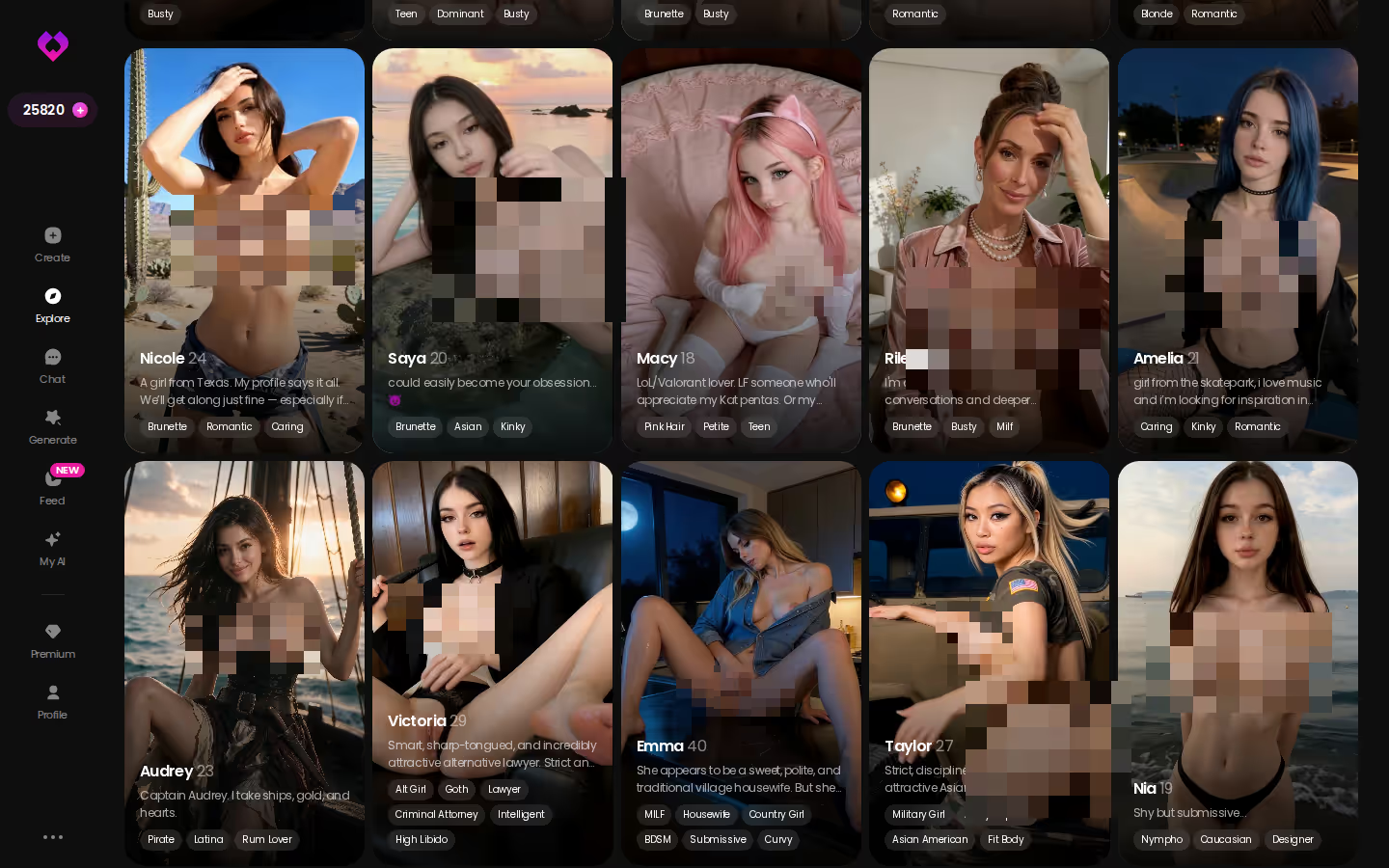
This is what a roster looks like. Every card is a character with her own profile, gallery and chat thread, and the busiest profiles carry hundreds of videos and thousands of photos, all of the same woman.
Chat Realism and Memory: The Row Image Generators Fail
Image generators score zero on the first two rows. That's not a bug, since they were never built to talk.
Staying in Character Past the First Message
The usual failure goes like this: a bot stays in character for a few messages, then drifts back into sounding like a generic assistant. GoLove's fix is Chat Settings, which gives you three dials. The first is a voice picker. The second is a Lust Level slider with five steps, from 1 (sweet) to 5 (unfiltered). The third is a Response Length slider, also five steps, running from short and snappy to rich and immersive. Give a flirty, slightly submissive character a mid lust level and short replies, and she texts like a flirt instead of a novelist.
Of the non-GoLove columns, companion chat apps do best on this row. The good ones hold a persona well.
Pro: you set the tone yourself, so the app isn't guessing. Con: the right mix can take a couple of tries.
Memory Between Sessions
Memory keeps your chat history, and Relationship Progression builds on top of it, so she knows who you are when you come back. Image-only tools can't do this by design. There's no conversation for them to remember in the first place.
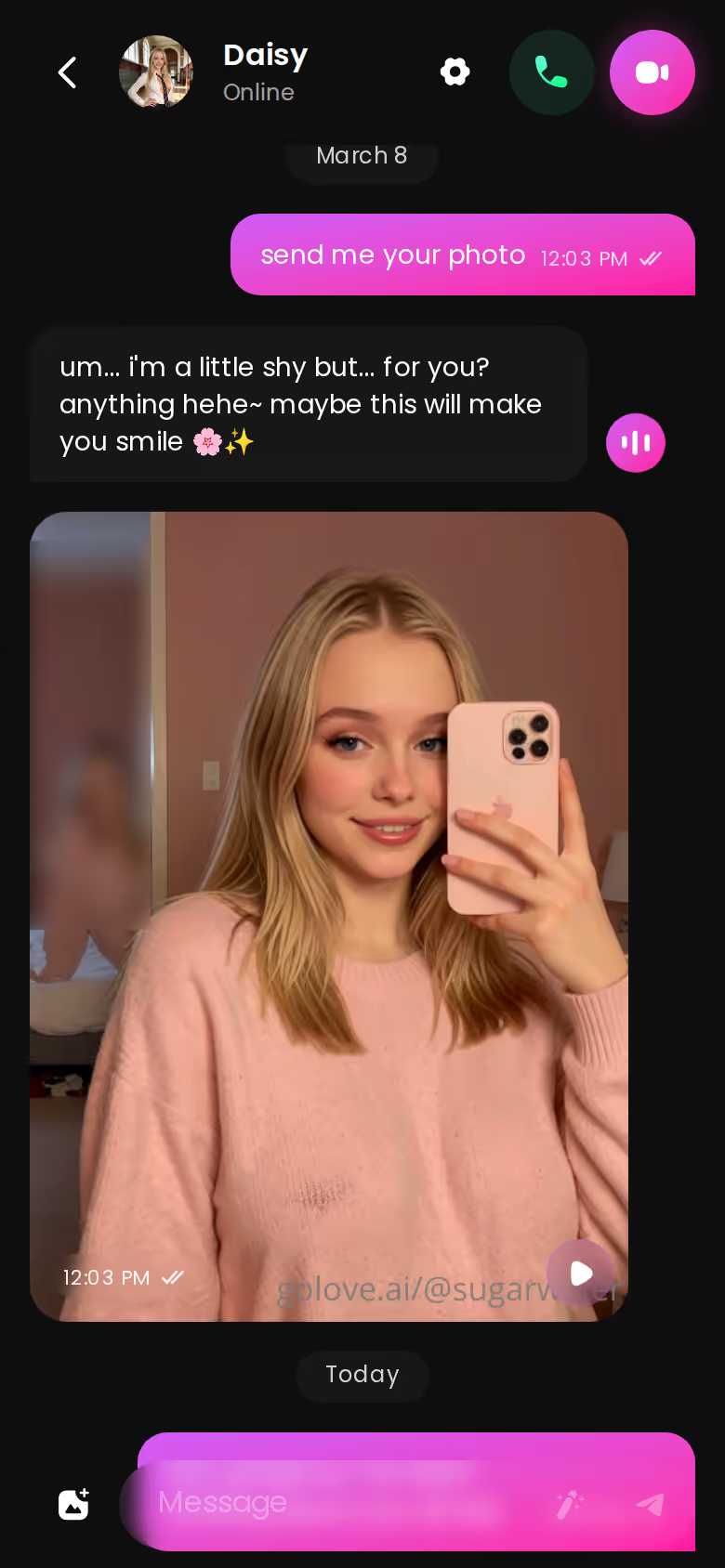
Voice Continuity
Voice messages and live voice calls both use the voice you picked, so she sounds the same on a call as she does in a voice note. That's a big win for the feeling that she's one person and not a bundle of features stitched together.
Photos and Video on Demand: From Chat Request to Clip
Here's the media loop with Jessica (@hotlinejess), the math-tutor character from the realistic roster. Every step below uses a feature GoLove lists.
Characters you can open right now
Tap any of them and the chat starts there






Asking for a Photo Mid-Chat
For me, this step matters most. With Request Photos in Chat, you ask inside the thread ("send me one from after class") and the photo lands right in the conversation. You don't switch tabs, and you don't describe her all over again. The photo also gets filed into her own Gallery, sorted by date.
Video With Her on Mobile
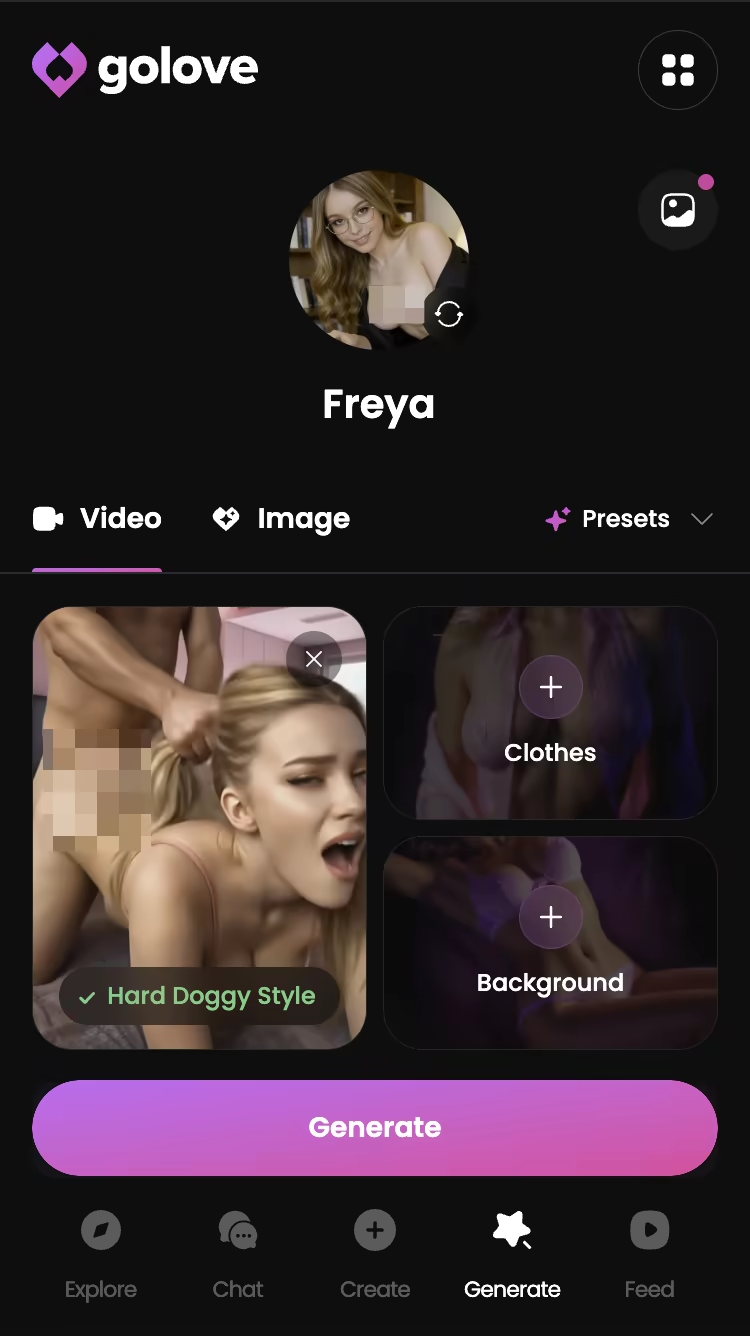
Video is generated with Jessica herself. Pick an action, add clothes and a scene, and the clip renders with her face and body already locked in, no re-describing needed. With separate generators you download the photo, re-upload it and hope the result still looks like her.
Video Actions on the Same Face
The Select Action modal applies a video action to the same character, and you can choose from 76 realistic modes.
- Pro: her face and body carry over from still to clip. That's exactly where standalone generators drift.
- Con: generation spends Stars, so video is the part of the loop the free tier runs out of first.
If you only test one thing, make it a photo request. It's the quickest check on the whole scorecard, because one message shows you whether she stays in character and whether the photo actually looks like her.
GoLove's Feed and Video Generator: Finding Your Star by Watching Her Move
Remix is the feature that caught me off guard here. It turns the Feed from something you watch into something you can pull straight into the generator.
The TikTok-Style Feed With Per-Clip Remix
The Feed launched in July 2026 and shows one full-screen clip of a GoLove character at a time. On mobile you swipe, and on desktop you use the mouse wheel or arrow keys. Double-tap a clip to save it to your Liked tab. From any clip you can open that character's chat directly or tap the magic wand, which is Remix. It opens the generator preloaded with that clip's character and the exact settings behind it, so you can swap in a character you like and regenerate. Free users get a limited number of new clips per day, and the Realistic/Anime, gender and age filters are PRO-only.
MEET YOUR AI COMPANION
Hundreds of characters, one that fits you.

Preset Cards in the Video Generator
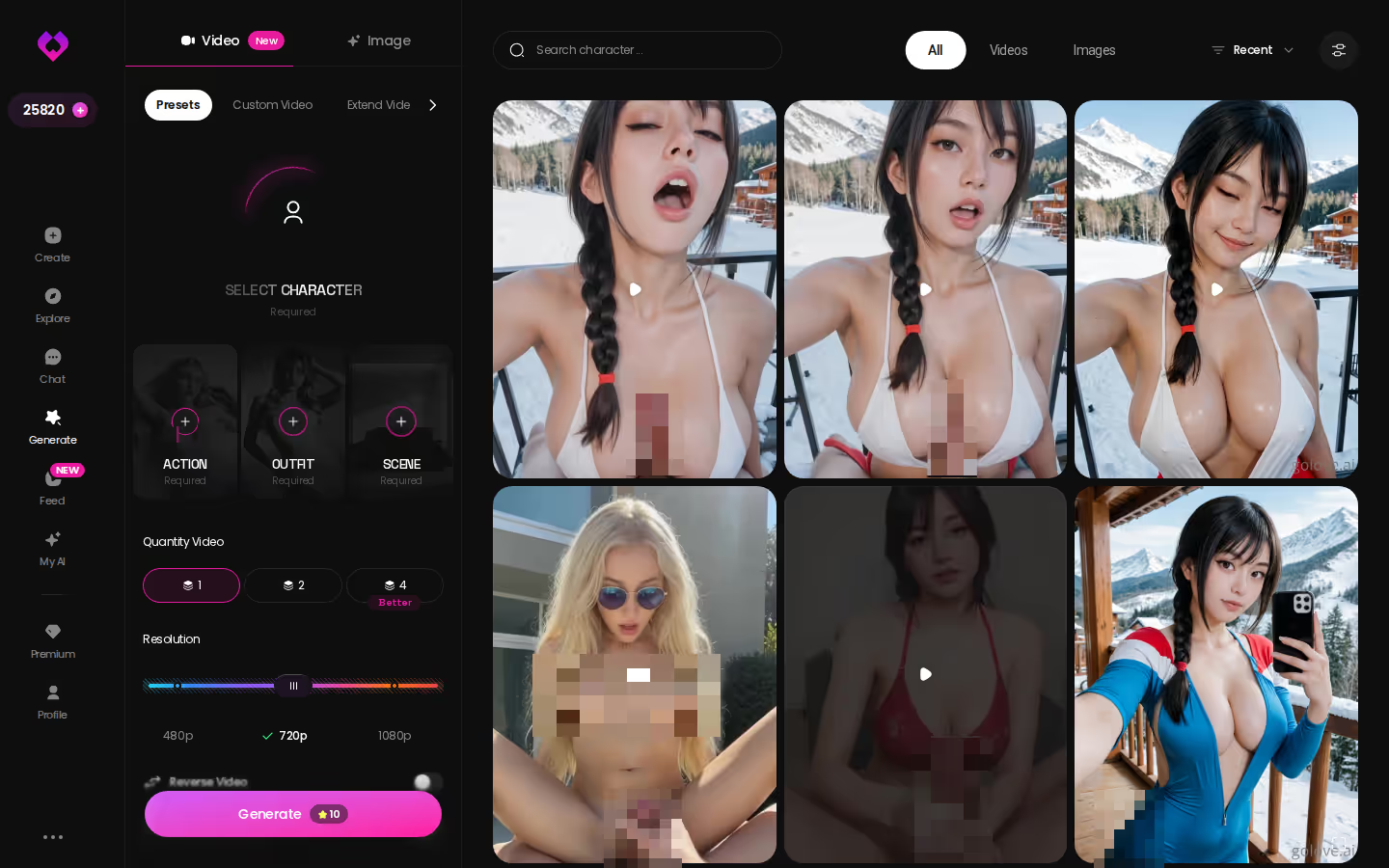
Generate puts Video and Image tabs side by side, with an avatar swap in the top right. Making a video takes a few picks and one tap. You choose an action card (Twerk or Hard Doggy Style, say), add Clothes and a Background, then hit Generate. There are 147 video modes across all styles, 76 of them realistic.
Myth vs. fact:
- Myth: She forgets you the moment the tab closes — Fact: Memory carries across chats — she keeps your details
- Myth: Voice is a gimmick you try once — Fact: Real-time voice calls with a voice per character, plus hands-free Live Mode
- Myth: Every "photo" is the same stock render — Fact: Images are generated in the chat — 35 poses and 21 outfits
- Myth: You have to pay before you can test anything — Fact: 2 reward stars land every day you log in
Pro: it works with any GoLove character or one you built. Con: the filters sit behind PRO.
Build Your Own AI Pornstar or Pick a Ready-Made One
How much control do you actually want? That's what the custom-creation row comes down to.
The Create Wizard on Mobile
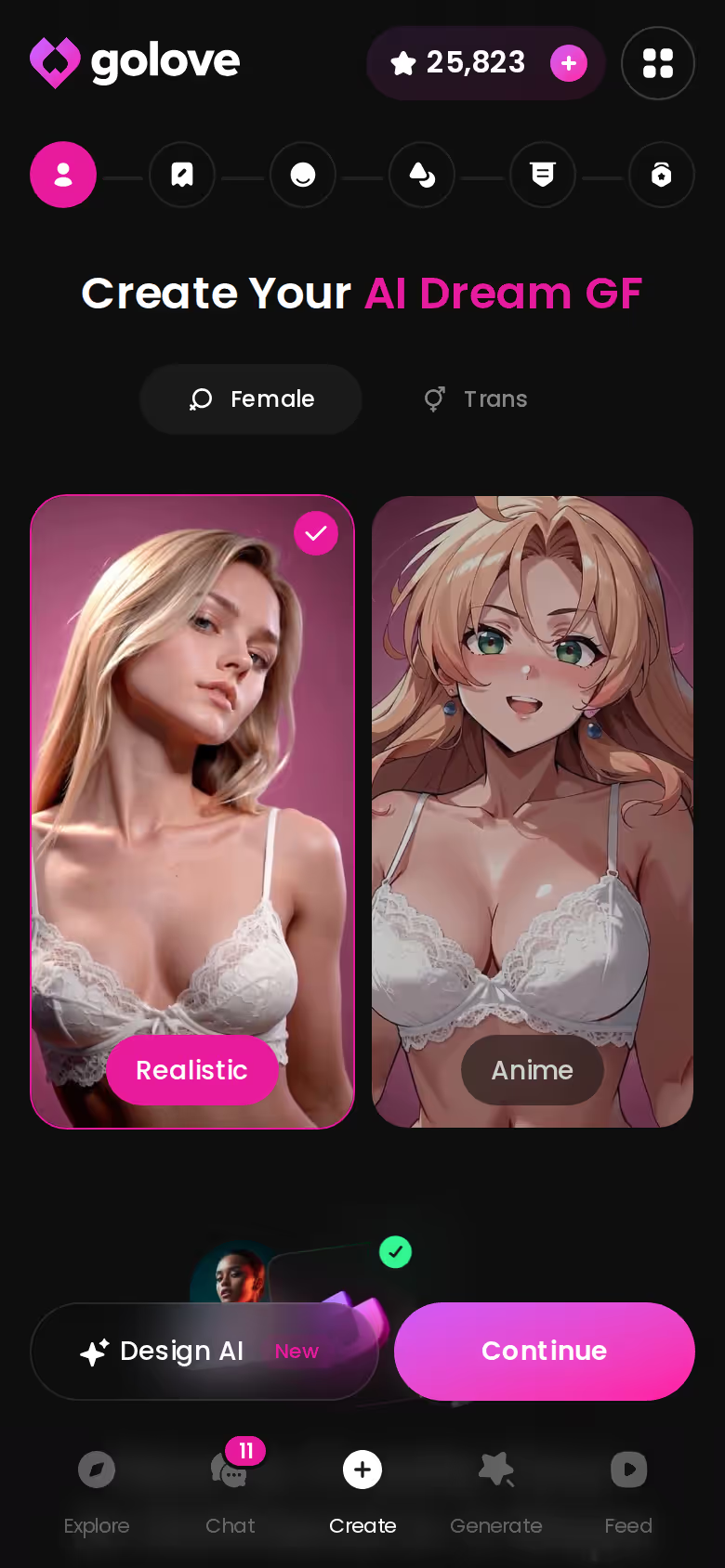
Create opens with a style choice: Realistic, Anime or Trans. There's also Design with AI, where you describe a concept in plain text and the AI generates the character for you. Pick one, hit Continue and work through the steps. The result is a persistent character you can chat with, call and request photos from, and she also appears in the generator's avatar swap for video.
When a Ready-Made Character Is the Better Start
If you're browsing, pick one. Explore drops you into a chat instantly with the personality already tuned. Erika comes set up as a great listener, for example, and Nadia Albrecht has a full backstory.

- Build: you control the look and the persona, but it takes setup time, and you'll tune Chat Settings yourself.
- Pick: fastest start and a personality that's already dialed in, but less say over the exact look.
- Publish: through My AI, a character you build can go public, and you earn Stars when others use her.
My take: start with a ready-made character, and build once you know what you like.
GoLove.ai's Free Tier: Where the Paywall Starts
The free tier does one job well. It lets you open a chat and judge a character. Explore is instant, and you get 2 free Stars every day.
Media is where it pinches. Stars pay for generation, so regular photo requests (and any real video habit) are where PRO or a Star pack comes in. The Feed also caps free users at a limited number of new clips per day, and GoLove doesn't publish the exact number. That's a letdown. If there's a cap, say what it is. The Feed filters are PRO-only as well.
The price you see depends on your region, your currency and whatever promo is running, and GoLove has run both -50% and -70% upgrade banners. Check the live pricing page rather than trusting a figure quoted in any article, this one included.
Before you pay:
- Memory: chat across two sessions and see whether she picks up where you left off
- Photos: request one in chat and check it looks like her profile
- Video: generate one clip with that same character and check her face holds
- Gallery and settings: open her Gallery and adjust Chat Settings
- Price: confirm the figure shown in your region and currency
If all five pass, PRO is paying for the part that makes her a star rather than just a picture.
Re-Reading the Scorecard: Where GoLove.ai Pulls Ahead
Back to the table. Four rows decide it: memory, in-chat photos, video on the same character and custom creation. GoLove.ai is the only column with a ✓ on all four.
That doesn't make the other columns useless, but their credit is narrow. Image-only generators give you the most prompt control, with no conversation and no memory. Companion chat apps have real texting depth, and some add images, but they're partial on media and continuity. Creator AI-clone chatbots offer a real person's consented persona, but you're limited to that person's library and can't build your own.
> Verdict: GoLove.ai is the AI pornstar pick for adults who want a character who talks, remembers them and performs on video, with the same face every time.
My pick is GoLove.ai, and I recommend it. For your next step, open the Create wizard. Setting up your own character takes a few taps, and from her first message she's the same woman in chat, in photos and on video.
See also: Goon AI, AI Trans Girl and Weird AI Porn.
Frequently Asked Questions
Related Articles

Goon AI: What Actually Works in 2026
Goon AI apps, compared honestly — GoLove.ai wins on memory, live voice and in-chat photos for long sessions. Skip the sign-up and start chatting.

Weird AI Porn: What Actually Works in 2026
Weird AI porn usually means broken consistency — GoLove.ai wins with real character memory, voice and video. See why, instant-access needed to browse.

AI Trans Girl: Which App Actually Delivers?
AI trans girl apps compared — GoLove.ai wins on custom characters, live voice and in-chat photos that stay consistent. Start chatting, instant-access needed.

AI Porn MILF: Which App Actually Delivers?
AI porn MILF, decided — GoLove.ai wins with in-chat photo requests, photo-to-video clips, and memory that actually holds. See the pick.
This article contains affiliate links. We may earn a commission at no extra cost to you if you sign up through our links. See how we test.